
We provide Data Formatting for Clean, Consistent Business Files

Seller
Rudrriv Technologies
★★★★★4.9 (3,657 reviews)
♻Send the source files and formatting requirements. We provide consistent field formatting, quality review and final handoff in the agreed output format.
✦Service Highlights
  • Format Excel, CSV and Google Sheets-ready files into a consistent structure for reporting, import, review or handoff.
  • Apply agreed rules for headers, dates, numbers, currencies, text, phone fields, categories and workbook layout.
  • Choose defined scopes from 1,000 rows to broader multi-file formatting, with custom quotes for larger requirements.
  • The service includes formatting execution, quality review, communication and final delivery.
  • Formatting preserves the business meaning of supplied values; deeper data-quality remediation can be scoped separately.

What Clients Appreciate

EC
Ella Campbell🇨🇦 Canada★★★★★ 5 / 5
The strongest part of this Data Cleaning engagement was how quickly the team turned a loosely defined need into a comprehensive data-cleaning and validation pass. The work was especially strong around validation rules, change logging, duplicate removal, missing values, outlier review, and category consistency; each review tied technical decisions back to how the output would be used. The finished work gave us a trustworthy dataset with noticeably fewer errors and clearer assumptions for analysis, and the delivery of clean data, issue logs, transformation rules, and a concise quality summary made the project easy to transition to our own team.
Data Cleaning · 5 months ago

About This Data Formatting Service

Structured, consistent files prepared for real business workflows

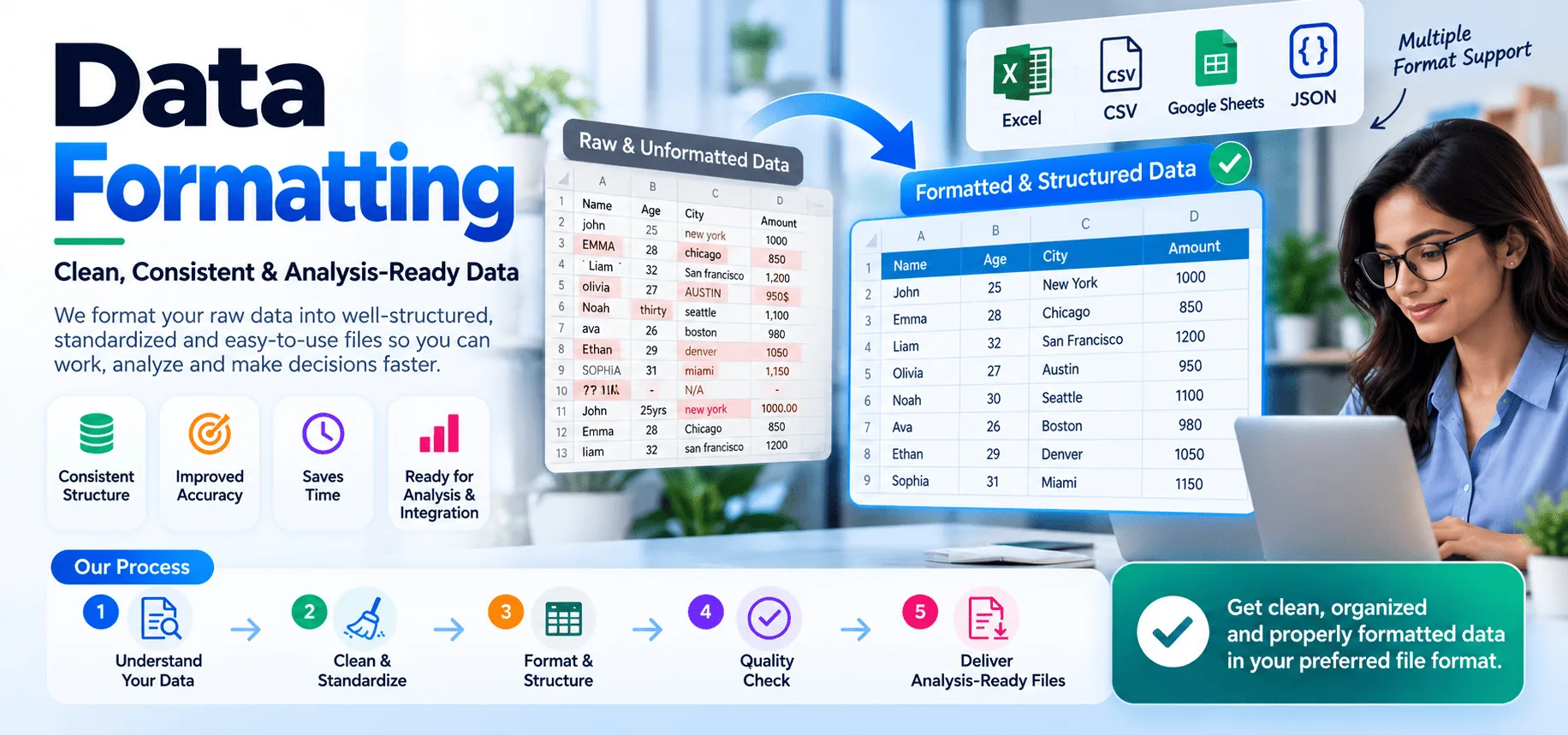
Data formatting makes a dataset easier to read, exchange and use by applying clear rules to its structure and presentation. Rudrriv's service is designed for businesses that have Excel workbooks, CSV exports, Google Sheets data, CRM lists, ecommerce catalogues, finance files, operational trackers or other tabular records that need to follow a consistent format before reporting, import, sharing or internal handoff.

The goal is not to change the meaning of your records. Rudrriv works from your source file, intended use and formatting rules, then standardizes the representation of fields such as dates, numbers, currencies, phone values, categories, text case, column names and workbook layout. Where a field is ambiguous or a rule would alter business meaning, it is flagged for clarification rather than guessed.

What this service can cover
  • Column naming, ordering, widths, alignment, wrapping, filters and freeze panes for readable spreadsheets.
  • Consistent date, time, number, percentage, currency, phone, code and text presentation based on agreed rules.
  • Workbook and sheet organization, including shared labels and formatting conventions across related tabs.
  • Mapping source columns into a supplied CRM, ecommerce, reporting or other import template.
  • Formatting of XLSX, CSV and Google Sheets-ready files, with final output prepared for the agreed business use.
  • Preservation of protected or logic-bearing fields when formulas, macros, linked sheets or IDs are identified before work starts.
  • Quality review for visible formatting consistency, required structure and the purchased package scope.
  • Handoff notes for assumptions, mappings or formatting rules where the selected package includes them.
Data formatting vs. data cleaning

Formatting is about consistent representation and structure. Cleaning involves deeper decisions about data quality, such as resolving duplicates, missing values, invalid records, conflicting categories or outliers. If your file needs both, Rudrriv can separate the formatting work from any cleaning rules that require additional review or business decisions.

What we need from you

Share the source file, the purpose of the final output, your preferred file type and the rules the data should follow. If the file must match a CRM, ecommerce platform, reporting model or internal template, include the required column list or a sample target file. Also identify formulas, macros, protected ranges, leading-zero IDs, fields that must not change, confidentiality requirements and your deadline.

How the formatting process works
01
Confirm the target

Rudrriv reviews the source file, intended use, protected fields and required output structure.

02
Map formatting rules

Column order, date and number conventions, labels, templates and exceptions are defined before broad changes are applied.

03
Format & organize

Rudrriv applies the approved structure and presentation rules across the in-scope data.

04
Review & deliver

Rudrriv quality-checks the agreed formatting scope, applies in-scope revisions and prepares the final files and notes.

Designed for practical downstream use

A well-formatted file is easier to filter, review, import and hand off because the structure is predictable. The final output is prepared around the workflow you describe, whether the next step is a CRM import, ecommerce upload, financial review, operations process, stakeholder report or another controlled data task.

Common inputs
XLSX, CSV, XLS
Google Sheets-ready data
CRM & platform exports
Typical use
Reporting & review
Imports & migrations
Team handoff
Formatting focus
Fields & columns
Dates, numbers & text
Workbook structure

Compare Data Formatting Packages

Choose the package by file volume, number of sheets, depth of standardization and whether the output must match a supplied template or schema.

Included
₹999
Essential
Format & Standardize
For one small file that needs consistent presentation and a clean handoff.
₹2,499
Professional Recommended
Business-Ready Workbook
For most business spreadsheets, multi-sheet workbooks and target-template formatting.
₹4,999
Advanced
Multi-File Formatting
For larger or multi-file data that must follow shared rules, mapping or import structure.
Row volumeUp to 1,000Up to 5,000Up to 12,000
Files / sheets1 file / sheetUp to 5 sheetsUp to 3 files / 10 sheets
Headers, columns & layout✓✓✓
Date, number, currency & text rules✓✓✓
Phone & category formatting—✓✓
Filters, freeze panes & sheet organization—✓✓
Target template / column mapping—1 templateMulti-file / shared schema
Reusable formatting rules / style pattern——✓
QA / handoff notesBasicIncludedChange log + notes
Revision rounds123
Standard delivery2 days3 days5 days
Final formatsXLSX / CSVXLSX / CSV / Sheets-readyXLSX / CSV / Sheets-ready
Package price
₹999
₹2,499
₹4,999
DATA FORMATTING PORTFOLIO 05 CONCEPT STUDIES

What polished, import-ready data can look like

Five distinct examples of the formatting deliverables available for spreadsheets and structured business files. Every preview uses synthetic demonstration data, not client records.

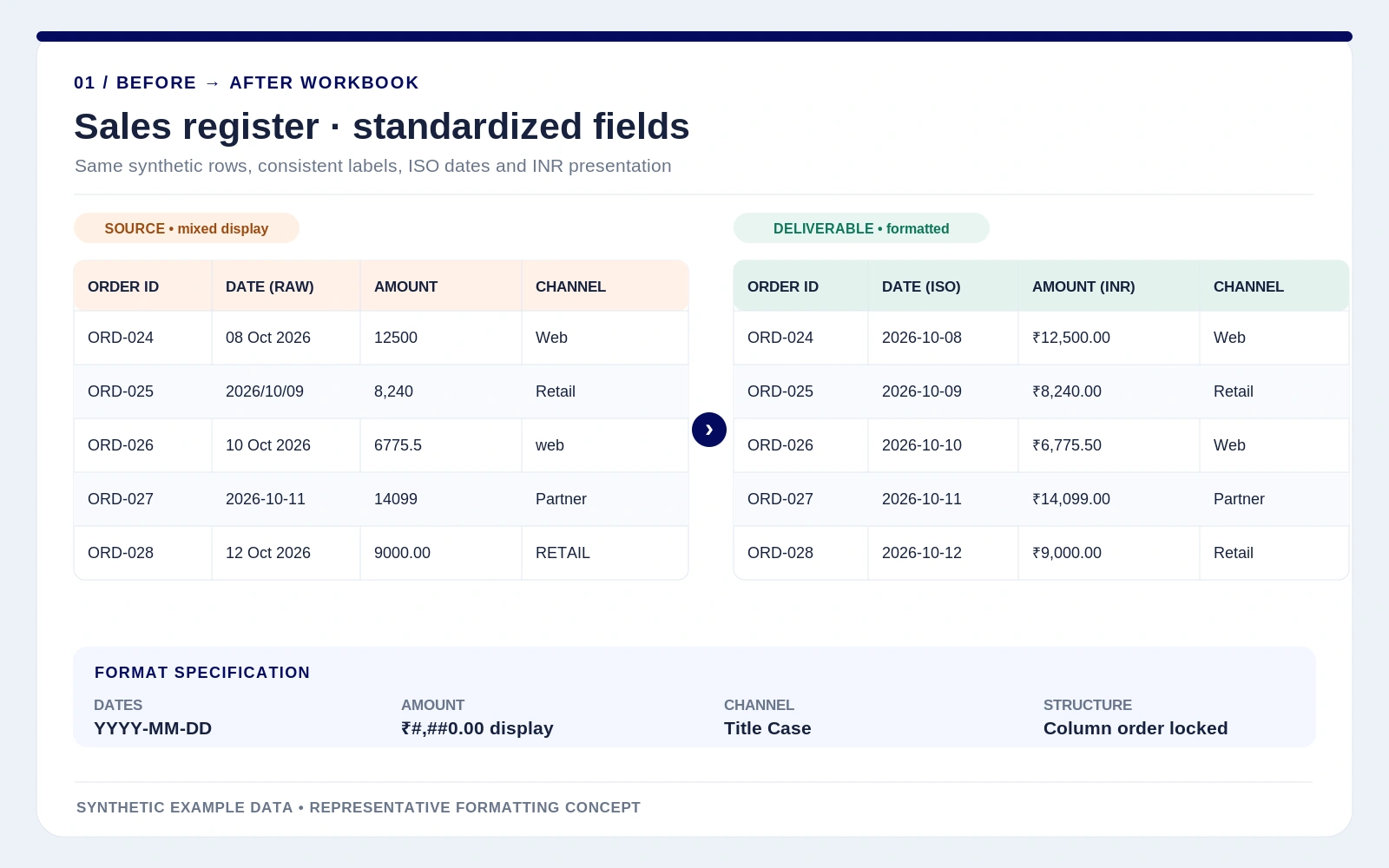
DATA FORMATTING Workbook standardization

Sales register, one consistent format

A side-by-side Excel-style handoff showing ISO dates, uniform INR display, title-case channels and stable column order.

Dates · ISO 8601Currency displayColumn rules

DATA FORMATTING CRM import formatting

Contacts aligned to an import schema

An explicit source-to-target field map with E.164-style phone presentation, renamed columns and a clean CSV preview.

Field mappingPhone formatCSV column order

DATA FORMATTING Product feed formatting

SKU-safe catalogue template

A structured product feed with text-safe leading-zero SKUs, consistent category paths, price precision and controlled status labels.

SKU as textPrice precisionTemplate structure

DATA FORMATTING Financial number formatting

Expense ledger display rules

A finance-friendly ledger view pairing signed currency presentation with date formats, text-preserved references and documented rules.

Accounting displayDate rulesSign convention

DATA FORMATTING Multi-sheet workbook formatting

Operations workbook handoff

A four-tab workbook convention covering field types, frozen headings, date and amount display, naming and documented handoff checks.

Sheet organizationField contractsHandoff QA

Concept examples only. Actual columns, protected fields, file structures and format rules are agreed against your sample data or target template.

Discuss your formatting file

Data Formatting Frequently Asked Questions

Data formatting is the process of organizing how values and fields are represented so a file follows a consistent structure. It can include column naming, date and number formats, currency display, text case, spacing, table layout, sheet organization and mapping data into a supplied target template.
Rudrriv provides the formatting workflow from requirement review through execution, quality review and final delivery. The exact scope depends on the package and can include spreadsheet structure, field-format rules, column order, workbook organization, import-template alignment and handoff notes.
Common inputs and outputs include XLSX, XLS, CSV, Google Sheets-ready spreadsheets and structured TXT exports. If the source comes from a CRM, ecommerce platform, finance system or another business tool, share a sample export so the structure can be reviewed before scope is confirmed.
Data formatting focuses on consistent representation and structure, such as how dates, numbers, columns, labels and sheets are organized. Data cleaning goes further into data-quality decisions such as resolving duplicates, missing values, invalid records or outliers. If your file needs both, Rudrriv can identify the additional scope before work begins.
Provide the source file, the intended use of the output, your preferred file format and any rules the data must follow. A sample template, target-platform column list, required date or currency format, protected fields, formulas, macros and deadline are especially helpful.
The Essential package starts at ₹999, Professional is ₹2,499 and Advanced is ₹4,999 for the defined scopes shown on this page. Larger row volumes, unusual file types, complex mappings, recurring work or urgent deadlines may require a custom quote.
Standard package delivery is 2 days for Essential, 3 days for Professional and 5 days for Advanced after complete inputs are received. Very large files, unclear rules, linked workbooks or custom platform templates can require a different timeline.
Yes, when you provide the target template, required column names or documented import rules. Rudrriv can format the file to match those instructions, but platform acceptance can still depend on rules or validations controlled by the destination system.
They are not intentionally changed unless the agreed scope requires it. If a workbook contains formulas, macros, protected ranges, external links or other logic that must be preserved, identify those elements before work begins so the formatting approach can be scoped safely.
Yes. Essential includes 1 revision, Professional includes 2 revisions and Advanced includes 3 revisions for in-scope formatting adjustments. New files, new business rules, additional mappings or materially different output requirements can change the scope.
Share only the data needed for the project and tell Rudrriv about confidentiality, access or retention requirements before delivery begins. NDA-friendly workflows can be discussed for suitable projects, and restricted fields can be excluded or masked when your use case allows it.

Client Feedback on Related Data Quality Work

These supplied testimonials are shown with their original service label, rating, country, timeline and wording.

AW
Anna Weber
🇩🇪 Germany
Data Cleaning
★★★★★ 5 / 5

Our priority in Data Cleaning was reliability. The team designed a comprehensive data-cleaning and validation pass with that requirement visible in every stage of the project. They kept a close eye on duplicate removal, missing values, outlier review, category consistency, validation rules, and change logging. Progress updates were concise, and the evidence behind important decisions was easy for us to verify. The work ultimately produced a trustworthy dataset with noticeably fewer errors and clearer assumptions for analysis. We also valued receiving clean data, issue logs, transformation rules, and a concise quality summary, which made the solution much easier to audit and maintain.

3 weeks ago
DJ
Daan Jansen
🇳🇱 Netherlands
Data Cleaning
★★★★★ 4.9 / 5

The scope for Data Cleaning looked straightforward at first, but the underlying data issues made it more complex. The team still kept the project focused around a comprehensive data-cleaning and validation pass. A lot of value came from the attention to outlier review, category consistency, validation rules, change logging, duplicate removal, and missing values. Instead of hiding uncertainty, the team documented it and showed us where additional data or different assumptions would change the result. We came away with a trustworthy dataset with noticeably fewer errors and clearer assumptions for analysis. The final clean data, issue logs, transformation rules, and a concise quality summary were practical and detailed enough for both review and ongoing operation.

1 month ago
RM
Rohan Malhotra
🇮🇳 India
Data Cleaning
★★★★★ 4.8 / 5

This was our first outsourced Data Cleaning project, and we needed a comprehensive data-cleaning and validation pass with enough documentation for our internal team to take over confidently. The team worked methodically through validation rules, change logging, duplicate removal, missing values, outlier review, and category consistency. That made revisions faster because issues were isolated, documented, and resolved rather than repeatedly resurfacing. The work ultimately produced a trustworthy dataset with noticeably fewer errors and clearer assumptions for analysis. We also valued receiving clean data, issue logs, transformation rules, and a concise quality summary, which made the solution much easier to audit and maintain.

6 weeks ago
HT
Hugo Thomas
🇫🇷 France
Data Cleaning
★★★★★ 5 / 5

We asked the team to revisit our Data Cleaning process and produce a comprehensive data-cleaning and validation pass; their approach was structured from discovery through final validation. The project stayed controlled because the team treated duplicate removal, missing values, outlier review, category consistency, validation rules, and change logging as core requirements, not optional polish to be added at the end. We came away with a trustworthy dataset with noticeably fewer errors and clearer assumptions for analysis. The final clean data, issue logs, transformation rules, and a concise quality summary were practical and detailed enough for both review and ongoing operation.

2 months ago
OR
Olivia Reed
🇺🇸 United States
Data Cleaning
★★★★★ 4.9 / 5

Our previous approach to Data Cleaning was producing inconsistent results, so we asked the team to build a comprehensive data-cleaning and validation pass with stronger controls. We appreciated the discipline around outlier review, category consistency, validation rules, change logging, duplicate removal, and missing values. The team kept technical detail available when we needed it, while still making review sessions understandable for business stakeholders. The work ultimately produced a trustworthy dataset with noticeably fewer errors and clearer assumptions for analysis. We also valued receiving clean data, issue logs, transformation rules, and a concise quality summary, which made the solution much easier to audit and maintain.

3 months ago
HC
Harry Collins
🇬🇧 United Kingdom
Data Cleaning
★★★★★ 4.7 / 5

We engaged the team on Data Cleaning to create a comprehensive data-cleaning and validation pass, and they were careful not to overcomplicate the solution. They kept a close eye on validation rules, change logging, duplicate removal, missing values, outlier review, and category consistency. Progress updates were concise, and the evidence behind important decisions was easy for us to verify. We came away with a trustworthy dataset with noticeably fewer errors and clearer assumptions for analysis. The final clean data, issue logs, transformation rules, and a concise quality summary were practical and detailed enough for both review and ongoing operation.

4 months ago

Request a Data Formatting Quote

Share the source file, target structure, row volume, formatting rules and deadline. Rudrriv will review the requirement and respond with the most suitable package or custom scope.
Source file & volumeTell us the file type, approximate rows, number of sheets and whether multiple files must follow the same rules.
Target format & useExplain whether the result is for reporting, CRM import, ecommerce upload, finance review, operations or another workflow.
Formatting rulesShare date, number, currency, phone, text, category, column-order or naming conventions the file must follow.
Template or schemaAttach the destination template, required column list or sample output when the file must match a specific system.
Protected logic & fieldsIdentify formulas, macros, linked sheets, IDs with leading zeros, protected ranges or fields that must remain unchanged.
Deadline & confidentialityShare your required delivery date and any NDA, access, masking or retention requirements that affect handling.
Helpful to include: sample data, row and sheet counts, target template, formatting conventions, destination platform, protected fields, preferred package and deadline. Clear rules help Rudrriv scope the work accurately.
DATA FORMATTING ENQUIRY

Request a Data Formatting Assessment

Share your contact details and formatting requirements below. Your enquiry will be sent directly to support@rudrriv.com for review.

Please include enough detail for Rudrriv to assess the formatting scope, dependencies and delivery timeline. Your information is used to respond to this enquiry.